

Lately, working from home has shifted from being just a perk to becoming a reality for millions of people. Whether you’re logging in full-time, freelancing, or just handling a few tasks from home now and then, having a home office that’s comfortable, practical, and visually inviting can make a huge difference. A cluttered or awkward workspace can leave you feeling distracted, uncomfortable, and even physically strained, but a well-planned setup can spark creativity, boost efficiency, and create a sense of calm and balance throughout your day.
If you are looking to elevate your home workspace, the following home office setup tips will help you create a productive and enjoyable environment. These tips cover everything from desk placement and ergonomic furniture to lighting, storage solutions, and decor.
16 Home Office Setup Tips to Create Your Ideal Workspace
1. Choose the Right Location
The first step in designing a home office is choosing the right location. Ideally, your workspace should be a quiet area with minimal distractions. If possible, select a room with a door to separate work from home life. For those living in smaller apartments, a dedicated corner of a living room or bedroom can work if it is organised and visually separated from personal space.
Natural light is a key consideration. Working near a window can enhance your mood, boost energy, and reduce eye strain. If your room lacks windows, invest in high-quality lighting that mimics daylight. Adjustable LED desk lamps are great options, offering focused illumination for work tasks while being easy on the eyes.
2. Invest in Ergonomic Furniture
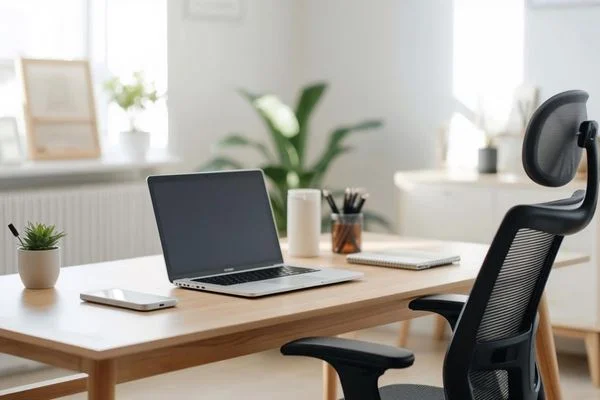
Your body will thank you if you prioritise ergonomics in your home office. An ergonomic office chair is a must. Look for a chair with adjustable height, lumbar support, and a comfortable seat cushion. Spending hours in a poorly designed chair can lead to back pain, neck strain, and fatigue, so investing in comfort is essential.
Desk height also matters. Standard desks are typically around 29 inches high, but adjustable desks allow you to customise the height for your comfort. Consider a sit-stand desk if you want the flexibility to alternate between sitting and standing throughout the day. This can reduce physical strain and even increase energy levels.
Monitor placement is another critical ergonomic factor. The top of your computer screen should be at or slightly below eye level, and your monitor should be about an arm’s length away. For laptops, a separate keyboard and laptop stand can help maintain proper posture.
3. Organise Your Space Efficiently
Clutter can be a productivity killer. Creating an organised workspace can help you stay focused and reduce stress. Start with the basics: drawers, shelves, and filing systems for documents and supplies. Desk organisers, cable management solutions, and trays can help keep everything in its place.
For those who prefer minimalism, consider a clean-desk approach. Keep only essential items on your desk, and store the rest in accessible drawers or shelves. This approach helps your mind focus and creates a visually calm environment.
Personal touches, like framed photos or a small plant, can make the space feel inviting without causing distraction. Indoor plants such as succulents or small ferns improve air quality and provide a touch of greenery, which can enhance mood and creativity.
4. Optimise Lighting for Comfort and Productivity
Lighting is often overlooked in home office design, yet it can profoundly affect your energy, focus, and even your sleep cycle. Natural light is ideal, but if that’s limited, artificial lighting should be layered to reduce eye strain.
A combination of ambient, task, and accent lighting works best. Ambient lighting provides general illumination for the room, such as overhead lights or floor lamps. Task lighting focuses on specific work areas, like a desk lamp for reading or writing. Accent lighting adds personality to the space and can create a cosy, inviting atmosphere.
Avoid harsh overhead fluorescent lights if possible, as they can cause headaches and fatigue. Warm-toned bulbs around 2700K to 3000K are generally comfortable for long work sessions. Additionally, consider the placement of screens to prevent glare, which can strain your eyes over time.
5. Pay Attention to Colour and Design
The colours and design of your home office can influence your mood and productivity. Soft, neutral tones such as whites, greys, or beige create a calming backdrop, while pops of colour like blue, green, or yellow can stimulate creativity and energy.
Blue is often associated with focus and calm, making it suitable for analytical tasks, while green evokes balance and harmony. Yellow adds a cheerful touch, boosting optimism and energy, but it’s best used as an accent rather than a dominant colour.
Decor is also a part of creating a motivating workspace. Inspirational quotes, art prints, or vision boards can provide subtle motivation and visual interest without overwhelming the space. The key is to strike a balance between functionality and aesthetics.
6. Leverage Technology and Accessories
A productive home office relies on more than just furniture. Technology and smart accessories can streamline your workflow and make your day more efficient. High-speed internet is non-negotiable. Investing in a reliable router and Wi-Fi extender ensures you stay connected, especially if you use video conferencing or cloud-based tools frequently.
Noise-cancelling headphones are essential for blocking out distractions in a busy household. Keyboard and mouse options that are comfortable and responsive can also reduce strain and make typing more efficient. For frequent video calls, consider investing in a good-quality webcam and microphone to ensure professional audio and video quality.
Cable management tools, such as clips, sleeves, and under-desk trays, can keep cords organised and out of sight, creating a cleaner workspace. Small accessories like desk organisers, pen holders, or a whiteboard for notes can also improve workflow and efficiency.
7. Create Zones for Work and Breaks
Separating work from relaxation is crucial, even at home. If space allows, create zones within your office. One area can be dedicated to focused work, while another serves as a spot for reading, brainstorming, or taking short breaks.
For instance, a small lounge chair or a bean bag in the corner allows you to step away from your desk without leaving your office entirely. A well-defined workspace signals to your brain that it’s time to focus, while a break area encourages mental rest.
Incorporating standing or movement breaks into your routine is also important. Even a few minutes of stretching or walking around every hour can prevent stiffness, improve circulation, and boost overall productivity.
8. Manage Noise and Distractions
Noise can severely impact concentration. For those who live in bustling households or near busy streets, soundproofing techniques can make a significant difference. Thick curtains, rugs, and upholstered furniture absorb sound, while door seals and window treatments can reduce external noise.
White noise machines or apps can mask distracting sounds and help maintain focus. Additionally, communicate your work hours to family members or roommates to reduce interruptions. Establishing a clear boundary between work and home life helps maintain productivity and prevents burnout.
9. Incorporate Storage Solutions for Efficiency
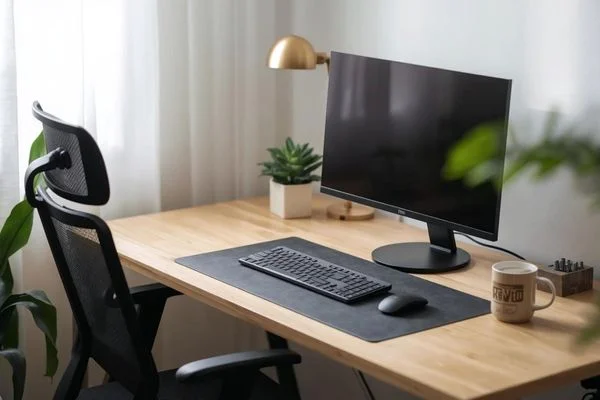
Efficient storage is not only about keeping your desk clean; it also enhances workflow. Use vertical space with shelves or wall-mounted organisers to store books, files, and supplies. Drawer dividers, baskets, and boxes can keep smaller items accessible and organised.
Digital organisation matters too. Scan important documents to reduce paper clutter, and utilise cloud storage solutions for files and projects. Having an organised digital workspace is just as critical as maintaining a physical one, especially in hybrid or fully remote work environments.
10. Personalise Your Workspace
Your home office should reflect your personality and make you feel motivated. Personalisation doesn’t mean cluttering the space; rather, it’s about adding meaningful touches that inspire you. Family photos, travel souvenirs, or motivational quotes can make the environment more enjoyable and unique.
Some people find that scented candles or essential oil diffusers improve focus and mood. Others may enjoy playing soft background music to stimulate creativity. Experiment with what energises and motivates you while keeping distractions minimal.
11. Focus on Health and Comfort
A productive home office prioritises both mental and physical health. Maintaining good posture and proper ergonomics can prevent long-term physical issues. Consider accessories such as footrests, wrist pads, or lumbar cushions if needed.
Temperature control is another factor. A room that is too hot or too cold can distract you and reduce productivity. Invest in fans, heaters, or portable air purifiers as necessary to maintain a comfortable environment.
Hydration and movement are also crucial. Keep a water bottle nearby, and schedule brief movement breaks to stretch or walk around. Healthy snacks within reach can prevent energy dips during long work sessions.
12. Embrace Minimalism for Focus
Minimalist home offices encourage focus by reducing unnecessary clutter. A minimalist approach emphasises only essential items, clean lines, and neutral colours, which can make the room feel larger and less overwhelming.
Eliminating visual distractions allows your mind to focus on tasks, boosting concentration and efficiency. Minimalism also simplifies cleaning and maintenance, giving you a tidy and inviting workspace every day.
13. Plan for Flexibility
Your work style and tasks may change over time, so planning for flexibility is key. Modular furniture, movable desks, or multipurpose storage can help you adapt your space as needed.
Flexibility also applies to your work habits. Some days you may need deep focus, while other days may require collaboration or creativity. Designing a workspace that accommodates multiple functions allows you to shift gears without compromising comfort or productivity.
14. Optimise for Virtual Meetings
For remote workers, virtual meetings are part of daily life. Creating a visually appealing and professional background for video calls is important. A clean wall, minimal decor, or a small bookshelf can provide a polished backdrop.
Good lighting is also crucial. Facing a window or having a desk lamp in front of you ensures your face is well-lit, avoiding shadows that can appear unprofessional. A consistent setup helps you look confident and focused during virtual interactions.
15. Regularly Refresh Your Space
Even the most well-organised office can become stale over time. Refreshing your workspace can reinvigorate your creativity and motivation. Rotate art, change desk accessories, or update lighting and furniture arrangements periodically.
A small refresh, such as adding a new plant or swapping a wall print, can make a surprisingly big difference in your mood and enthusiasm for work. Keeping the space dynamic encourages productivity and prevents monotony.
16. Budget-Friendly Tips
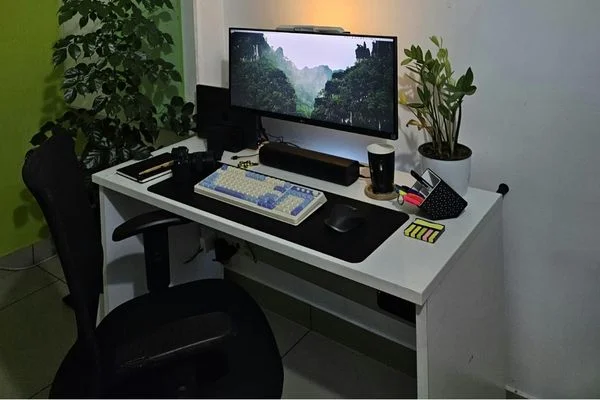
Setting up a home office does not have to be expensive. Start with essentials like a sturdy desk, chair, and lighting, and gradually invest in accessories and decor. Secondhand furniture, DIY storage solutions, and budget-friendly lighting can help you create a functional office without breaking the bank.
Even small changes can have a significant impact. Rearranging your desk, decluttering, or adding a few personal touches can transform a basic setup into an efficient, enjoyable workspace.
Your Blueprint for a Better Home Office
Creating a home office that supports productivity, comfort, and well-being requires thoughtful planning and attention to detail. From choosing the right location and investing in ergonomic furniture to organising your space and incorporating personal touches, every aspect contributes to a better work experience.
By following these home office setup tips, you can design a space that not only meets your professional needs but also enhances your creativity, focus, and overall satisfaction. Remember, a well-designed home office is more than just a desk and chair; it is a space that nurtures your work, health, and mindset, allowing you to thrive in the evolving world of remote work.